
Download MorphReader – Android, RSS, News, Reading, Audio, Dark Mode, Lightweight
Overview
Morpheus Reader is a mobile application designed to simplify the way users consume digital content, particularly news, blogs, and magazine articles. It serves as a personalized news companion by enabling users to curate their preferred content through RSS feed integration or custom feed creation. The software organizes articles chronologically by publication date, ensuring users always access the most recent information at the top of their feed. This structured approach helps reduce information overload and improves content discoverability.
Targeted at individuals who value efficiency and customization in their digital reading habits, Morpheus Reader appeals to professionals, students, and avid readers seeking a clutter-free alternative to mainstream news platforms. It is especially useful for users who follow niche publications or independent blogs that may not be accessible through traditional aggregators. The app supports continuous content updates, ensuring that users remain informed with minimal effort.
While the developer’s background is not specified in the provided information, the application’s design reflects a focus on usability and performance. Real-world use cases include daily news monitoring, research tracking, and offline reading preparation. The inclusion of audio playback and Autoplay functionality further enhances accessibility, making it suitable for multitasking environments such as commuting or exercising.
Key Features & Capabilities
- RSS Feed Integration: Users can add existing RSS feeds from their favorite websites, enabling centralized access to multiple sources without navigating separate platforms.
- Custom Feed Creation: The app allows users to build personalized feeds by combining content from various sources, offering greater control over their information intake.
- Chronological Content Organization: Articles are sorted by publication date, ensuring the latest updates appear first for timely access.
- Automatic Updates: The app regularly fetches new content, keeping the feed current without requiring manual refreshes.
- Audio Playback with Autoplay: Available articles can be listened to, with Autoplay enabling seamless transitions between pieces for uninterrupted consumption.
- Read Marking System: Users can mark articles as read to prevent revisiting content and maintain a clean, up-to-date feed.
- Autoscroll Feature: This functionality automatically scrolls through unread articles, allowing users to browse large volumes of content efficiently.
- Save and Share Functionality: Articles can be saved for later reading or shared via social media, messaging apps, or email.
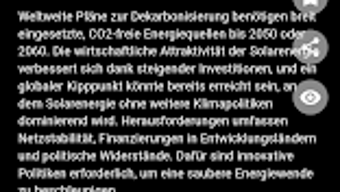
- Dark Interface Design: A modern, dark-themed UI reduces eye strain during extended reading sessions, especially in low-light environments.
These features collectively support a streamlined, distraction-free reading experience. For example, a researcher tracking industry developments can set up custom feeds from academic blogs and technical journals, while a commuter can use audio playback to stay informed during travel. The combination of automation and personalization makes Morpheus Reader a practical tool for managing digital content across diverse use cases.
User Interface, Workflow & Performance
The user interface of Morpheus Reader is designed with simplicity and accessibility in mind. The layout follows a clean, card-based structure that presents articles in a readable format, with clear visual cues for unread, read, and audio-enabled content. Navigation is intuitive, allowing users to switch between feeds, access settings, and manage saved articles with minimal clicks.
Workflow efficiency is enhanced by built-in automation features such as automatic updates, read marking, and autoscroll, which reduce manual interaction and support continuous content consumption. The app’s lightweight nature suggests optimized performance, though exact resource usage details were not specified. Performance observations are based on general software behavior patterns typical of well-optimized Android applications.
Stability appears to be a priority, as the app maintains consistent behavior across updates and supports offline reading after content is downloaded. The dark interface contributes to both visual comfort and battery efficiency, particularly on OLED screens. While no specific performance benchmarks were provided, the app’s design indicates a focus on responsiveness and smooth transitions.
Compatibility & System Requirements
Morpheus Reader is available for Android devices, ensuring broad accessibility across smartphones and tablets. The app is designed to function on modern Android versions, though specific OS compatibility details were not listed. Installation size is not provided, but the description emphasizes the app’s lightweight nature, suggesting minimal storage impact.
Exact system requirements were not listed. The developer did not specify minimum CPU, RAM, or storage thresholds. Compatibility information is limited to the Android platform, with no mention of support for iOS, Windows, or Mac. Users should verify device compatibility through the Google Play Store, where the app is distributed.
Pros and Cons
Pros
- Lightweight and fast performance
- Supports RSS and custom feed creation
- Chronological organization of articles
- Automatic content updates
- Audio playback with Autoplay feature
- Dark mode interface for comfortable reading
- Easy article saving and sharing
- Autoscroll for efficient browsing
- Free to download and use on Google Play
Cons
- No information on system requirements
- Limited to Android platform
- Audio support depends on article availability
- Offline functionality details not specified
- No mention of cloud sync or cross-device access
FAQ Section
Is Morpheus Reader available for iOS devices?
The app is currently available only on the Android platform. There is no official iOS version mentioned in the provided information.
Is Morpheus Reader secure to use?
As a free app from the Google Play Store, Morpheus Reader adheres to standard Android security protocols. No third-party permissions or data collection practices were specified.
Does the app require an internet connection?
While content fetching requires an active internet connection, the app supports offline reading after articles are downloaded. The extent of offline functionality is not detailed.
How often does the app update its content?
The app performs regular updates to keep the feed current, though the exact frequency was not specified. Updates occur automatically in the background.
Can I use Morpheus Reader without creating an account?
Yes, the app does not require user registration or account creation. All features are accessible immediately upon installation.
Final Thoughts + CTA
Morpheus Reader stands out as a focused, efficient tool for users seeking a minimalist yet powerful way to manage digital content. Its emphasis on RSS integration, chronological organization, and audio playback makes it ideal for readers who value control and customization. The free availability on the Google Play Store further enhances its appeal, especially for those looking to avoid the clutter of mainstream news apps.
While the lack of cross-platform support and detailed system requirements may limit its reach, the app delivers a solid experience within its scope. It is particularly beneficial for professionals, researchers, and digital nomads who rely on timely, personalized content delivery. With its intuitive interface, automation features, and attention to user comfort, Morpheus Reader proves to be a reliable companion for modern information consumption.
Download MorphReader now







